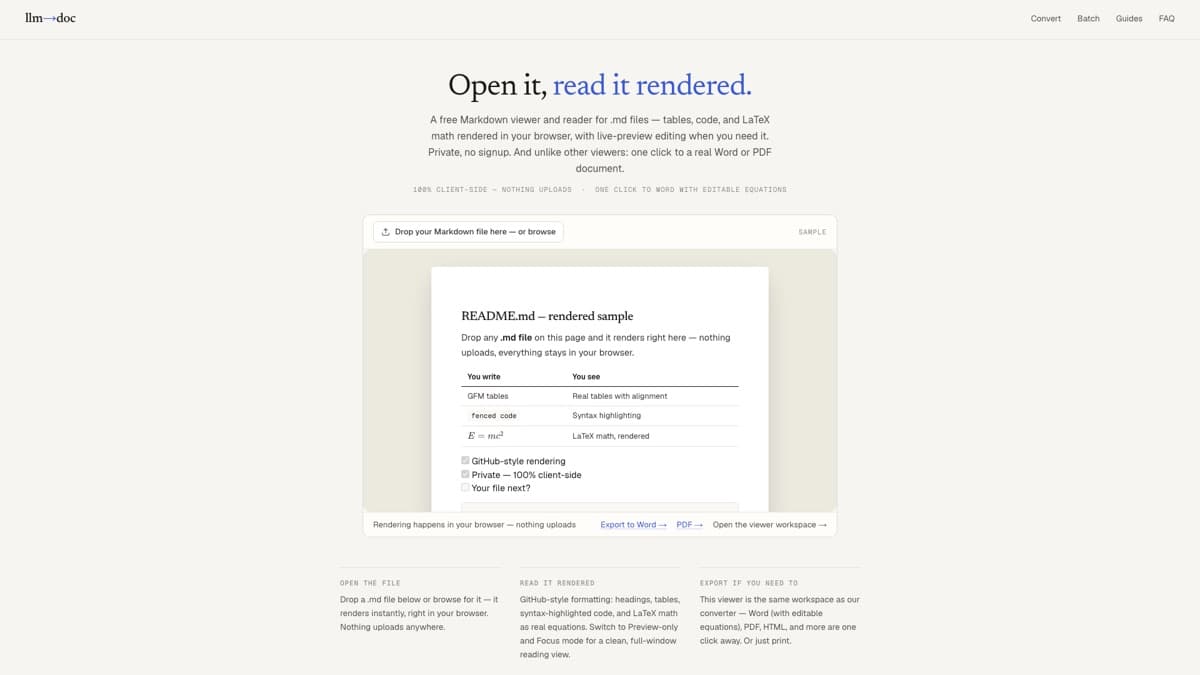
It’s plain-text Markdown — any editor shows the raw syntax, a viewer shows the document. Here’s the fastest way to read one, on anything, free.
Key facts
.md = Markdown: plain text with lightweight formatting syntax — used by READMEs, docs, notes apps, and AI chat exports.
Fastest open: a browser viewer — no install, renders tables, code, and LaTeX math.
Privacy: our viewer runs client-side; the file never uploads.
Need a document? The same tool exports to Word (editable equations), PDF, and HTML — free.
Step 01
Know what you're looking at
A .md file is plain text written in Markdown — a lightweight syntax where # makes a heading, **bold** makes bold, and | pipes | make tables. READMEs, AI chat exports, and notes apps all produce them.
Because it's plain text, nothing can 'corrupt' it — any editor can open it raw. The question is whether you see the syntax or the formatted document.
Step 02
Open it rendered, in your browser
Drop the file on our Markdown viewer — it renders instantly with GitHub-style formatting: headings, tables, syntax-highlighted code, even LaTeX math as real equations.
Everything runs client-side: the file never uploads anywhere. Works on Windows, macOS, Linux, and mobile — no install, no account.
Step 03
Read (or edit) comfortably
Switch to Preview-only and Focus mode for a clean full-window reading view, use Contents to jump between sections, or flip to Split view to edit the Markdown with a live preview.
Esc exits Focus mode. The Print button gives you paper or a quick save-as-PDF.
Step 04
Convert it if you need a document
The viewer is also a converter: one click exports the same file to Word (real tables, editable equations), PDF, HTML, and more.
This is the part standalone viewers skip — when the .md needs to become a deliverable, you're already in the right tool.
A .md file opened in the browser viewer — tables, code, and math rendered the way the author meant them, no install.
Other ways to open it
Windows, without a browser
Notepad opens any .md raw (right-click → Open with → Notepad) — fine for a quick look, but you'll see syntax, not formatting. VS Code (free) renders a side-by-side preview with Ctrl+Shift+V.
macOS, without a browser
TextEdit shows the raw text. For rendered reading, Quick Look previews plain text (spacebar), and VS Code or the free Typora-style editors give a formatted view.
On your phone
Most mobile editors treat .md as plain text. The browser viewer route works as-is on iOS and Android — open the page, pick the file, read it formatted.
Word / Google Docs users
Word doesn't open .md natively — it shows raw syntax. Convert the file to .docx first (step 04) and it opens as a normal document with real headings and tables.
Frequently asked questions
What program opens a .md file by default?
Usually none — operating systems don't ship a Markdown renderer, which is why double-clicking often asks you to pick an app. Any text editor opens it raw; a Markdown viewer (like ours, in the browser) shows it formatted.
Is a .md file safe to open?
Yes — it's plain text, it can't execute anything. Renderers also sanitize embedded HTML (ours strips scripts and dangerous tags before rendering).
How do I open a .md file without downloading software?
Use the browser viewer: drop the file on llm2doc.app/markdown-viewer and it renders instantly. Nothing installs and the file never leaves your device.
How do I convert a .md file to Word or PDF?
Open it in the viewer and click Download DOCX (or PDF). Tables become real Word tables and LaTeX math becomes editable Office Math equations — free, no signup.
Why does my .md file look like code with # and ** everywhere?
You're seeing the raw Markdown syntax in a plain-text editor. Open the same file in a Markdown viewer and those symbols become headings, bold text, lists, and tables.
Open your .md file now
Drop it on the viewer — rendered in a second, private, free.